Michel Bergeron

Comprendre · Mettre en pratique · Partager

Auteur/autrice : Michel Bergeron

  • A fresh start for michelbergeron.ca

    A fresh start for michelbergeron.ca

    Français | English · All articles

    Today, I’m launching a new version of my website: a place to introduce my background, share my experience and discuss Microsoft 365 and everyday technology.

    This launch also supports my professional search: I’m looking for a role or contract within a company, ideally working remotely, in Microsoft 365 administration and support.

    Bringing my experience to a team

    My background includes running my own IT services business and managing Microsoft 365 environments for approximately 125 client organizations. I have also worked on government assignments, including Exchange Online administration.

    Exchange Online, Outlook and Entra ID are areas of particular interest to me. I enjoy understanding people’s needs, finding the cause of a problem and explaining solutions clearly. Customer service and user support are central to how I work, in both French and English.

    I’m now looking to contribute that experience as part of a team.

    Learn more about my Microsoft 365 administration and support experience and the type of role or contract I’m looking for.

    Understand, put into practice, share

    This website also gives me a place to share practical tips, explanations and lessons from experience. You’ll find articles about Microsoft 365, online services and technology challenges at home and at work.

    My approach is simple: understand, put into practice and share. Start with a real situation, explain what is happening and offer useful ways forward.

    I can also provide occasional independent assistance. My main professional goal remains finding a role or contract within a company, ideally remotely.

    Let’s connect

    Do you know a team looking for an experienced Microsoft 365 administration or support professional? Do you have an opportunity to discuss?

    Get in touch or connect with me on LinkedIn. I’d be happy to talk.

    Welcome to michelbergeron.ca, and enjoy reading!

    Privacy and cookies

  • Un nouveau départ pour michelbergeron.ca

    Un nouveau départ pour michelbergeron.ca

    Français | English · Tous les articles

    Je lance aujourd’hui une nouvelle version de mon site : un endroit pour présenter mon parcours, partager mon expérience et échanger autour de Microsoft 365 et de l’informatique au quotidien.

    Ce lancement accompagne aussi une démarche professionnelle : je suis à la recherche d’un poste ou d’un mandat au sein d’une entreprise, idéalement en télétravail, en administration et en soutien Microsoft 365.

    Mettre mon expérience au service d’une équipe

    Mon parcours m’a amené à diriger ma propre entreprise de services informatiques et à gérer les environnements Microsoft 365 d’environ 125 organisations clientes. J’ai également réalisé des mandats en milieu gouvernemental, notamment en administration d’Exchange Online.

    Exchange Online, Outlook et Entra ID sont des domaines qui m’intéressent particulièrement. J’aime comprendre les besoins, chercher la cause d’un problème et expliquer les solutions clairement. Le service à la clientèle et le soutien aux utilisateurs occupent une place centrale dans ma façon de travailler, en français comme en anglais.

    Aujourd’hui, je souhaite mettre cette expérience à contribution au sein d’une équipe.

    Pour en savoir plus, découvrez mon expérience en administration et soutien Microsoft 365 et le type de poste ou de mandat que je recherche.

    Comprendre, mettre en pratique, partager

    Ce site me permet aussi de partager des conseils pratiques, des explications et des retours d’expérience. Vous y trouverez des articles sur Microsoft 365, les services en ligne et les problèmes informatiques que l’on rencontre à la maison comme au travail.

    Mon approche tient en trois mots : comprendre, mettre en pratique et partager. Partir d’une situation concrète, expliquer ce qui se passe et proposer des pistes utiles.

    Je peux également apporter une aide ponctuelle de façon autonome. Ma priorité professionnelle demeure toutefois de trouver un poste ou un mandat en entreprise, idéalement à distance.

    Gardons le contact

    Vous connaissez une équipe qui cherche une personne expérimentée en administration ou en soutien Microsoft 365? Vous avez un mandat à me proposer?

    Communiquez avec moi ou retrouvez-moi sur LinkedIn. Je serai heureux d’échanger avec vous.

    Bienvenue sur michelbergeron.ca, et bonne lecture!

    Confidentialité et témoins

  • À la recherche de mon prochain mandat Microsoft 365

    À la recherche de mon prochain mandat Microsoft 365

    Français | English · Tous les articles

    Je suis à la recherche de mon prochain poste ou mandat en administration et en soutien Microsoft 365. Je privilégie le télétravail ou les possibilités sur la Rive-Sud de Montréal.

    Ce que je peux apporter à votre équipe

    Mon parcours combine le soutien technique, l’administration de Microsoft 365 et l’expérience d’avoir dirigé ma propre entreprise de services informatiques. J’ai géré les environnements Microsoft 365 d’environ 125 organisations clientes et réalisé des mandats en milieu gouvernemental, notamment au ministère de la Justice.

    Mes domaines de prédilection sont Exchange Online, Outlook et Entra ID. La configuration de boîtes aux lettres partagées et de groupes, l’exécution de scripts PowerShell et l’accompagnement des utilisateurs font partie de mon expérience.

    Une approche centrée sur le service

    J’aime comprendre les besoins, chercher la cause d’un problème et expliquer les solutions clairement. J’offre un soutien en français comme en anglais, avec le souci de rendre les outils plus simples à utiliser au quotidien.

    Je continue aussi à développer mes connaissances, notamment en sécurité, en conformité, en Azure et en administration de Copilot et des agents. Mes certifications Microsoft sont présentées sur la page Présentation.

    Vous avez un besoin ou une occasion à me proposer?

    Pour un poste, un mandat ou une première discussion, communiquez avec moi ou contactez-moi sur LinkedIn. Je serai heureux d’échanger sur vos besoins et sur la façon dont je pourrais contribuer à votre équipe.

    Adapté de ma publication LinkedIn.

    Confidentialité et témoins

  • Mon domaine, LinkedIn et HTTPS : d’une redirection à mon propre site

    Mon domaine, LinkedIn et HTTPS : d’une redirection à mon propre site

    Français | English · Tous les articles

    Avant de relancer ce site, j’avais choisi une solution simple : faire pointer michelbergeron.ca vers mon profil LinkedIn. Mon parcours et mes publications s’y trouvaient déjà. Mais une redirection qui fonctionne en HTTP peut encore échouer en HTTPS.

    Pourquoi HTTPS change la donne

    Quand une personne ouvre une adresse en HTTPS, son navigateur établit d’abord une connexion sécurisée avec le domaine de départ. Le certificat doit donc être valide pour ce domaine avant que le navigateur puisse recevoir la redirection vers LinkedIn. Le HTTPS de LinkedIn ne suffit pas à sécuriser cette première étape.

    Configurer HTTPS et la redirection avec Cloudflare

    J’ai déplacé la gestion DNS de mon domaine vers Cloudflare, tout en conservant son enregistrement chez mon registraire. J’y ai configuré la prise en charge du HTTPS et une règle de redirection vers mon profil LinkedIn. Chez Cloudflare, les règles de redirection nécessitent une configuration DNS adaptée, avec un enregistrement passant par leur proxy.

    Avant de changer les serveurs DNS, il faut recopier et vérifier les enregistrements existants. Pour la messagerie, cela comprend notamment les enregistrements MX et les valeurs SPF, DKIM et DMARC. Une redirection web ne devrait pas interrompre les courriels.

    Pourquoi j’avais choisi une redirection temporaire

    Une redirection 301 annonce un déplacement permanent et peut être conservée en cache. Une redirection 302 annonce un déplacement temporaire. J’avais choisi la 302 parce que je voulais garder la possibilité de faire évoluer mon domaine.

    Et maintenant : un site pour mes articles

    La démarche a justement évolué. Mon domaine accueille maintenant la nouvelle version de mon site, où je rassemble mes articles sur Microsoft 365 et l’informatique au quotidien. LinkedIn reste un lieu d’échange et le point de contact pour mon parcours professionnel.

    Le conseil reste le même : testez votre adresse en HTTP et en HTTPS, vérifiez le certificat et assurez-vous que la destination obtenue est celle que vous souhaitez. Lorsque vous remplacez une redirection par un site, vérifiez aussi les règles qui pourraient encore envoyer vos visiteurs ailleurs.

    Références

    Cloudflare : rediriger un domaine · Paramètres des redirections et codes HTTP

    Adapté de ma publication LinkedIn sur mon domaine et HTTPS, avec une mise à jour sur la création de ce site.

    Confidentialité et témoins

  • Crave fige sur ma télé LG : trois tests avant d’accuser Internet

    Crave fige sur ma télé LG : trois tests avant d’accuser Internet

    Français | English · Tous les articles

    Un soir, je m’installe devant ma télé LG pour regarder une émission sur Crave. L’image fige, repart, puis coupe de nouveau. Mon premier réflexe : penser que la connexion Internet fonctionne mal. Pourtant, Netflix et YouTube jouent normalement sur la même télé.

    Une application qui bloque ne prouve pas une panne Internet

    Ce constat ne règle pas tout, mais il donne une piste. Si plusieurs services fonctionnent et qu’un seul bloque, il vaut mieux examiner l’application, l’appareil ou le service concerné avant d’accuser le routeur ou le fournisseur Internet.

    Trois comparaisons pour mieux cerner le problème

    1. Essayer une autre application sur le même appareil. Si Netflix ou YouTube fonctionne, une panne générale de connexion devient moins probable. Cela n’exclut pas un problème particulier entre Crave et le réseau.

    2. Essayer Crave sur un autre appareil, sur le même réseau. Un téléphone, une tablette ou un ordinateur peut aider à déterminer si le problème semble propre à la télé. Utilisez votre propre compte et un appareil compatible.

    3. Essayer un autre contenu dans Crave. Si une seule émission pose problème, notez le titre et l’épisode. Cette information peut être utile au soutien de Crave.

    Ce qui a fonctionné dans mon cas

    Un redémarrage complet de la télé a réglé le problème que je rencontrais. Ce résultat décrit mon expérience ; il ne signifie pas que toutes les interruptions de Crave ont la même cause.

    La procédure de redémarrage varie selon le modèle. Consultez les instructions de votre téléviseur pour effectuer un redémarrage complet : une simple mise en veille peut ne pas avoir le même effet. Si le problème persiste, vérifiez les mises à jour de la télé et de l’application, puis les recommandations du fabricant et de Crave.

    Le réflexe utile, à la maison comme au travail

    Changer une chose à la fois aide à comprendre ce qui se passe. Notez ce qui fonctionne, ce qui échoue et ce qui change après chaque test. Vous pourrez expliquer le problème plus précisément, sans remplacer un appareil ni modifier tout le réseau au hasard.

    C’est la même démarche que j’utilise en soutien informatique : partir du symptôme, comparer les situations et avancer avec des observations concrètes.

    Pour aller plus loin

    Conseils LG pour les applications qui figent ou ne se chargent pas. Les options et les menus peuvent varier selon le modèle.

    Adapté de ma publication LinkedIn « C’est l’internet qui marche pas ».

    Confidentialité et témoins

  • Looking for my next Microsoft 365 opportunity

    Français | English · All articles

    Michel Bergeron at his computer, illustrating his search for a new opportunity.

    I’m looking for my next role or contract in Microsoft 365 administration and support. I prefer remote opportunities or positions on Montreal’s South Shore.

    What I can bring to your team

    My background combines technical support, Microsoft 365 administration and the experience of running my own IT services business. I have managed Microsoft 365 environments for approximately 125 client organizations and worked on government assignments, including at the Department of Justice.

    My main areas of interest are Exchange Online, Outlook and Entra ID. My experience includes configuring shared mailboxes and groups, running PowerShell scripts for certain administrative tasks and helping users.

    A service-focused approach

    I enjoy understanding people’s needs, finding the cause of a problem and explaining solutions clearly. I provide support in both French and English, with a focus on making everyday tools easier to use.

    I also continue to build my knowledge of security, compliance, Azure, and Copilot and agent administration. My Microsoft certifications are listed on the About page.

    Do you have an opportunity or a need to discuss?

    For a role, a contract or an initial conversation, get in touch or contact me on LinkedIn. I’d be happy to discuss your needs and how I could contribute to your team.

    Adapted from my LinkedIn post.

    Privacy and cookies

  • My domain, LinkedIn and HTTPS: from a redirect to my own website

    Français | English · All articles

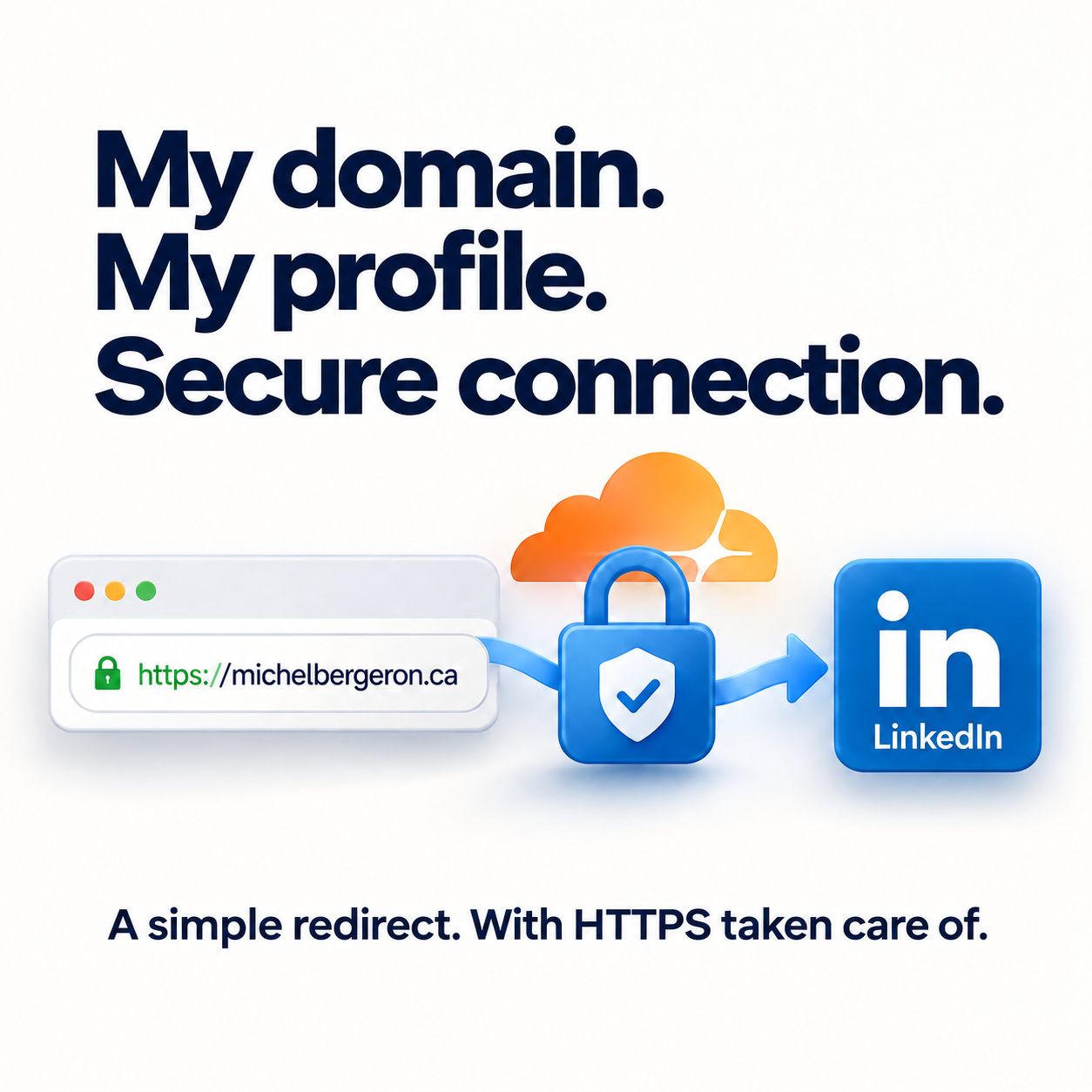
    Illustration of michelbergeron.ca redirecting to LinkedIn over a secure HTTPS connection.

    Before relaunching this website, I chose a simple solution: redirect michelbergeron.ca to my LinkedIn profile. My professional background and posts were already there. But a redirect that works over HTTP can still fail over HTTPS.

    Why HTTPS makes a difference

    When someone opens an HTTPS address, their browser first establishes a secure connection with the original domain. That domain therefore needs a valid certificate before the browser can receive the redirect to LinkedIn. LinkedIn’s HTTPS connection does not secure this first step.

    Setting up HTTPS and the redirect with Cloudflare

    I moved my domain’s DNS management to Cloudflare while keeping the domain registered with my registrar. I configured HTTPS support and a redirect rule pointing to my LinkedIn profile. Cloudflare redirect rules require the appropriate DNS setup, including a record routed through its proxy.

    Before changing nameservers, copy and verify your existing DNS records. For email, this includes MX records and SPF, DKIM and DMARC values. A website redirect should not interrupt your email.

    Why I chose a temporary redirect

    A 301 redirect indicates a permanent move and can be cached. A 302 redirect indicates a temporary move. I chose 302 because I wanted to keep the option of changing how I used my domain.

    And now: a home for my articles

    That approach has evolved. My domain now hosts the new version of my website, where I bring together articles about Microsoft 365 and everyday technology. LinkedIn remains a place to exchange ideas and connect around my professional background.

    The advice remains the same: test your address over both HTTP and HTTPS, check the certificate and make sure you reach the destination you intended. When replacing a redirect with a website, also check for rules that may still send visitors elsewhere.

    References

    Cloudflare: redirect a domain · Redirect settings and HTTP status codes

    Adapted from my LinkedIn post about my domain and HTTPS, with an update on the creation of this website.

    Privacy and cookies

  • Crave freezes on my LG TV: three checks before blaming the Internet

    Français | English · All articles

    Crave and LG illustration for a home troubleshooting article.

    One evening, I sat down in front of my LG TV to watch a show on Crave. The picture froze, resumed, then stopped again. My first thought was that the Internet connection was acting up. Yet Netflix and YouTube played normally on the same TV.

    An app freezing does not prove an Internet outage

    That observation does not answer every question, but it gives us a clue. If several services work and only one gets stuck, it makes sense to look at the app, device or service involved before blaming the router or Internet provider.

    Three comparisons to narrow down the problem

    1. Try another app on the same device. If Netflix or YouTube works, a general connection outage becomes less likely. This does not rule out a specific issue between Crave and the network.

    2. Try Crave on another device on the same network. A phone, tablet or computer can help determine whether the issue seems specific to the TV. Use your own account and a compatible device.

    3. Try different content in Crave. If only one show causes problems, note the title and episode. That information may help Crave support.

    What worked in my case

    A full restart of the TV resolved the problem I was experiencing. That describes my experience; it does not mean every Crave interruption has the same cause.

    The restart procedure varies by model. Check your TV’s instructions for a full restart: simply putting it into standby may not have the same effect. If the issue continues, check for TV and app updates, then consult the manufacturer’s and Crave’s recommendations.

    A useful habit, at home and at work

    Changing one thing at a time helps you understand what is happening. Note what works, what fails and what changes after each test. You’ll be able to explain the issue more precisely, without replacing a device or changing the entire network at random.

    It’s the same approach I use in IT support: start with the symptom, compare situations and work from concrete observations.

    Further reading

    LG tips for apps that freeze or fail to load. Options and menus may vary by model.

    Adapted from my LinkedIn post about an apparent Internet problem.

    Privacy and cookies